|
By Brenda L. Peterson, The Layoff Lady Don't Go It AloneLife is challenging when nothing in particular is happening. When you're going through a job change (especially one you didn't plan), it's even harder. While I'm a fan of self-reliance, I also know the value of finding people who want to support you and letting them do it. You're not weak for needing people. You are smart for planning ahead for what you will need. You Need Help Because This is HardI have been through a post-layoff job transition 7 times, and it is difficult each and every time. There is the fear that it will just never end, and you'll be drifting for eternity trying to find paid work where you can pay your bills--much less in a job you want. You worry that you'll have to settle for something that may be even worse than the worst job you've ever had. You also worry that you'll run out of money and not be able to pay your bills and lose everything you own and everyone you've ever loved. While your rational mind knows this is all pretty unlikely, there will be moments when everything seems hopeless. That's where your support network comes in. No matter how resilient and downright badass you are, doing this alone makes it way harder. People Want to Help You: Make Sure to Let ThemAs an extra added bonus, people want to help you! I'm always inspired by people who come out of the woodwork to check on me, tell me about an open position, thank me for helping them once upon a time, or offer to refer me for a role. Everyone has struggled with something at one time or another, and someone has helped them. Let other people help you. Building Your TeamIt also takes a village to get you through a career transition. Relying on one person for everything is all kinds of stressful. Know that people want to help, and it's a matter of figuring out what you need, letting people know, and reaching out to people when needed. Going through a job search is challenging, even in the best of circumstances. It can be even more challenging if you're starting from a layoff (especially the part where someone else got to make a big, uninvited life decision for you). Types of Help You NeedHere's a starter list of the types of help you may need during your job transition. More specifically, here is some of what I needed. Use this as a starting point and add details as it helps you:
Who Can HelpWhen it comes to help, I start with my inner circle--close friends and family. I'm also sure to widen my support team beyond them, too. I also move beyond that immediate group. I interact with my LinkedIn connections. I tap into online groups including job search groups, The White Box Club, and even LinkedIn groups focusing on networking or a content area (like sales enablement). I interact with in-person membership groups like ATD or the Omaha OD Network. Or I seek out non-work connections through social Meetup groups or activities. Sometimes, I just spend time in coffee shops to indirectly interact with other people. It's a matter of figuring out what you need and finding a person to help. Asking for HelpKnow, too, that there will be times when you need to straight up reach out to someone because you need help. Each person will have their areas of interest and expertise, so be sure to keep that in mind when asking for help. It's helpful to consider who you might contact for different needs. Here are a few cases where I reached out to different people to ask for help:
Learn More
0 Comments
By Brenda L. Peterson, The Layoff Lady The Adventure of Finding a New JobWhether you're gainfully employed but looking for the next right opportunity for you, or you're in career transition, job searching is hard. Here are three unfortunate job searching truths that can help you manage your mindset and emotions as you work through the ups and downs of this process. Truth 1: Job Seeker Time Goes Slower Than Hiring Organization TimeWhen you're a hiring manager, you have a ton going on, and only one of those things is hiring a new person. You're still trying to manage your team, meet deadlines, troubleshoot customer problems, and juggle all the people you're considering for your open position. In an interview, when one candidate asks about the hiring process, you tell them you should know who will move on to the next steps in the process "by the end of this week"--and at the time, you believe that is a reasonable deadline. Then there is a software release with a bug that causes three meetings to be scheduled with big clients, or someone ends up out on sick leave unexpectedly, or your child has to be picked up from daycare with the flu. Friday comes and goes, and getting in touch with a candidate falls off your radar until the next week. Meanwhile, as a job seeker, you put a note on your calendar that you'll know one way or another by Friday. Then you analyze every syllable you uttered in the interview, hoping you didn't say anything awful. You rethink a facial expression you interpreted as approving and wonder if it really was that at all. You suffer through Saturday, Sunday, and Monday, secretly worrying that you will never find another job. Ever. Instead of spiraling, take action to get you closer to your goals. After the interview, email the hiring manager a thank you message and consider sending them a LinkedIn connection request. Put a note on your calendar for a few days after the hiring manager said they would contact you. Reach out to them at that time, including a few pleasantries, reiterating your interest in the role, and asking for an update. Will you get the job? It's hard to tell. Either way, you did your part. Remind yourself that you won't get every job you apply for, and reflect to see what you can learn from it. At the very least, pat yourself on the back that you didn't over-follow up (which is often worse than not following up at all), and be sure to focus on more than one job opportunity at a time. In addition, network with three more people and apply for three more jobs. Truth 2: It's Not "Your Job" Until You Receive A PaycheckInevitably as a job searcher, you run across it. THE job. It's the one you know is meant to be yours. It's perfect--easy commute, a great title, the go-to company, exactly what you are qualified (and want) to do. In your head, you think--this is MY job. You picture your new business cards, where you'll park, and how you'll introduce yourself as the "Director of Awesomeness" for this perfect company. If you're still working, you may be dreaming about the day you hand in your notice--or get excited knowing you won't have to finish a dreaded project because you'll be elsewhere. You think--why should I even bother applying for anything else because this one is SO my job! Except, well, it's not actually your job yet. You're looking at it and seeing yourself in it, but it's not real. You don't work there. No one is sending you a paycheck for it. They don't even know your name yet. You may very well still work at your company in a few months when the project you're not excited about is due. While this MAY be the job you eventually get, it's not a done deal yet. You know what else? It may not end up being your job. Apply for that job--even work hard to get it. Know, though, that you may end up not even getting called in for an interview. This doesn't mean you're not still an amazing professional with valuable qualifications. Remember, there are always many things going on when companies hire. There may be an internal candidate, a previous coworker of the hiring manager, someone who has a referral from a college friend, or someone who has even slightly more of a qualification that didn't make that job posting. When you're a hiring manager, you have a ton going on, and only one of those things is hiring a new person. You're still trying to manage your team, meet deadlines, troubleshoot customer problems, and juggle all the people you're considering for your open position. In an interview, when one candidate asks about the hiring process, you tell them you should know who will move on to the next steps in the process "by the end of this week"--and at the time, you believe that is a reasonable deadline. Then there is a software release with a bug that causes three meetings to be scheduled with big clients, someone unexpectedly ends up on sick leave, or your child has to be picked up from daycare with the flu. Friday comes and goes, and getting in touch with a candidate falls off your radar until the next week. Meanwhile, as a job seeker, you put a note on your calendar that you'll know one way or another by Friday. Then you analyze every syllable you uttered in the interview, hoping you didn't say anything awful. You rethink a facial expression you interpreted as approving and wonder if it really was that at all. You suffer through Saturday, Sunday, and Monday, secretly worrying that you will never find another job. Ever. Instead of spiraling, take action to get you closer to your goals. After the interview, email the hiring manager a thank you message and consider sending them a LinkedIn connection request. Put a note on your calendar for a few days after the hiring manager said they would contact you. Reach out to them then, including a few pleasantries, reiterating your interest in the role, and asking for an update. Will you get the job? It's hard to tell. Either way, you did your part. Remember that you won't get every job you apply for and reflect to see what you can learn from it. At the very least, pat yourself on the back that you didn't over-follow up (which is often worse than not following up at all), and focus on more than one job opportunity at a time. Whenever you fall in love with a job or think of something as "your job,” make an extra effort to apply for additional jobs--or at least game out what happens if you do not get the job. If the job you see yourself in works out, great. If not, you're still working towards your ultimate goal of finding a new role (complete with a paycheck), whichever one that might be. In addition, network with three more people and apply for three more jobs Truth 3: You Only Need One Job.Applying for jobs is a process. Looking back at my records, I have typically applied for between 40 and 100 jobs when I've been in career transition. It's easy to get discouraged. If you're working and looking for something else, you might be more selective in your applications and feel especially attached to an opening you see. Remember, not every personal referral, application, or interview will lead to an offer. Again--sometimes you apply and hear back a fat lot of nothing. Sometimes, you might get a quick rejection from a job only to see it reposted a week later. In those cases, it can be hard to see that they don't even have a good candidate, but they know it's not going to be me. That one smarts. It's also hard when you interview for a role multiple times only to hear that you didn't get the job. Even though they genuinely liked you, you didn't get it. Maybe you were a close second, perhaps they went with an internal candidate, or they ended up not filling the position. There is so much rejection in the job search process that you’ll inevitably feel sad and like maybe there is no hope for you finding the right next job for you. Instead of spiraling, take action to get you closer to your goals. At the end of the day, though, you only need one job. You only need one organization to tell you “Yes.” You only need one place where you and the employer agree to work together. Sometimes, it's helpful to remind yourself that all those no answers get you to the one yes you need. The trick is that you don't know which one will be that yes. You have to keep on keeping on until you find it. In addition, network with three more people and apply for three more jobs. Learn Moreby Brenda L. Peterson, The Layoff Lady Network Building in the BeforetimesPre-pandemic, "networking" typically meant attending in-person events, shaking a few hands, and having a somewhat meaningful conversation with another human. While in-person opportunities are again plentiful, webinars continue to be popular since they are a flexible way to bring people together to learn. Be sure to think of your network during virtual events, too. Connect with Webinar AttendeesLike many people, I have attended (and delivered) approximately a bijillion online meetings, trainings, and interactive instructor-led sessions. I've been approaching these sessions with a mind towards not just attending, but also making new connections. Although the process differs from in-person interaction with people, I have managed to connect with more people (and often form more meaningful connections) than attending in-person meetings and “working the room.” As someone who runs introverted and communicates effectively in writing, this was an opportunity to turn webinars into a bonus network-building exercise. Your Personal Webinar BrandingWhen attending a webinar, I make sure that people are able to see who I am, my full name, and a picture, if at all possible. I use the same photo I use on LinkedIn so that people associate me with that picture. I also make sure that my first and last name are present so people have a chance of being able to find me after the session--or will recognize my name. In addition, during the webinar, I interact during the session. This usually involves commenting in the chat when prompted--which is also an opportunity for other attendees to see my full name. During any small group interactions, I'm sure to turn my camera on so people can see my face, hear my voice, and see my name. If the presenter asks people to share out loud, I usually turn on my camera, and share my thoughts. Again, this is another opportunity for people to hear my voice, see my face, and see my name. Each of these "impressions" helps people start to get to know me at least a little bit. Finding Potential ConnectionsDuring a webinar, I often take a screenshot of the participant list and a gallery of attendees if people are on camera. Whenever possible, download the chat from the session. This helps me identify who was active in the webinar and gives me additional information on anything they might have shared during the session. I often make notes on notecards during sessions to help me remember who might have said what and key content covered. All of these details can help me when interacting with attendees later on when I send LinkedIn connection requests. Researching Potential ConnectionsAfter attending a webinar, here is my process for adding new LinkedIn connections:
One Option: Personalizing a Connection RequestPersonalizing connection requests is a great way to start building a relationship with a new professional contact. Here are the key components I include:
Personalized Connection Request ExamplesHere are a few examples of messages that you can use to invite people to connect. Currently, LinkedIn allows you to include up to 300 characters when personalizing connection requests. Hi, Jen. I see we both attended today’s White Box Club meeting. I’m also in career transition and seeking a new role in learning and development. Let's connect! I'm also always up for a 30-minute "virtual coffee" meeting to discuss how we can help one another as we job search. --Brenda Hi, Jack. Great to interact with you a bit at this morning's Excellence Share. I love sharing ideas with fellow L&D professionals. Let's connect! --Brenda Hi, Javier. I see we both attended today's "Sales Enablement Best Practices" webinar. I definitely enjoy learning from this group. Since you mentioned that you are job searching, be sure to check out The White Box Club on Meetup to help you as you find your next role. Let's connect! --Brenda Other Options: Showing Your Value as a ConnectionNow that LinkedIn limits the number of personalized connection requests those with the basic membership receive each month, sending personalized connection requests might not be an option for you. In those cases, here are a few other options for helping to show your value to a potential connection:
After The Initial ConnectionHow do you further nurture that relationship? Here are a few ideas.
Continue to Build The RelationshipAfter connecting with people initially, be sure to continue to nurture those connections. Posting useful content, and occasionally messaging people is one way to do that. Ideally, you can add value to the relationship before you are in a position where you need to ask those individuals for help. Learn Moreby Brenda L. Peterson, The Layoff Lady Learning About YourselfThe first step of job searching is figuring out what kind of a role you even want. Instead of jumping right into the job you did before, taking a little time for introspection is wise. One good step in this process is finding out more about your strengths. Learning about what you are good at--and how to tell the story of your talents and successes--can help you position yourself well as you apply and interview for a new role. People Are Good at Different ThingsIf you ask many people what they are good at, they would need help putting their natural abilities into words. Taking the StrengthsFinder assessment was a great starting point for me to better understand what I do well. Often, individuals are blind to their own unique talents. In the past, I have wrongly assumed that EVERYONE does the things I do. Like (of course) everyone takes notes regularly in everyday conversations when they learn something--and (of course) everyone makes a seating chart whenever they are in a group of new people to remember names. Turns out--NOPE! These are things I did that not everyone does. This was a huge breakthrough for me. So how do you figure out what you do that not everyone does? Part of the Answer: CliftonStrengths AssessmentThe CliftonStrengths Assessment (previously known as Clifton StrengthsFinder) is a wonderful tool for identifying what you are good at, how that manifests, and how your version of each strength shows up. The 30-minute online assessment includes 177 questions, including paired statements. Then, on a scale, you select which of the statements is more like you. From there, you'll receive a report identifying your top five strengths along with a more detailed description of how those strengths are exhibited in how you interact with the world. Reading a report about yourself (one that is freakishly accurate, by the way) is downright life-changing. After taking the assessment, you'll be able to see your unique talents and have language to explain how what you do sets you apart from others. Having a way to put your abilities into words can translate directly into your resume and how you talk about who you are and what you bring to the table. My Strengths and How They Show UpMy identified strengths, in order, are Strategic, Learner, Arranger, Achiever, and Individualization. Here are a few details I learned from my report and reflecting on those results:
More Strategies for Finding Strengths and TalentsHere are a few other strategies for identifying what you're good at and how you show up in the world:
Learn MoreBy Brenda L. Peterson, The Layoff Lady All The FeelsWhether due to an economic downturn, an acquisition, or a company reorganization, layoffs hapen all the time. Each person will experience a range of emotions when it happens to them. Even for someone who has gone through a layoff before, it is a tumultuous experience each and every time. Here is the good, the bad, and the ugly of the feelings people often experience surrounding an unplanned job loss. ShockThe phone call from HR, the perp walk through the office to the dreaded conference room, the last-minute ominous meeting invite, or the oddly timed tap on the shoulder all seem to come out of nowhere. There is something surreal about being pulled into a virtual or in-person room and having someone look you dead in the eye and tell you that you are going to go through a significant life change starting, well, now. Even if there were layoff rumors, news about leadership changes, or low sales reported for the quarter, it’s always a surprise on the date and time when layoffs go down. It’s the feeling of the ground being pulled out from under you. It’s the gap between expecting a full day of meetings and finding yourself in your car mid-morning with a white box. AngerEven if you were actively looking for a new role, a certain amount of anger goes along with a layoff. It could be frustrating learning about the people who didn’t get laid off (like that guy whose messes you've been cleaning up for the last year) and comparing your perceived value to theirs. It could be irritation at the timing (right after vacation, right before a holiday) and how that makes finding something new an even longer process. It might be the insult to injury when you realize that yesterday’s mission-critical work-all-night project has become irrelevant. In many cases, it might just be the maddening nature of someone else deciding when you don't get to do that job anymore instead of you getting to choose when it was time. Feeling that lack of control can be the most challenging part. SadnessExiting a job abruptly leaves a big hole in your life, starting with a 9+ hour workday being replaced with dead air and uncertainty. People who earlier that day were coworkers, casual work friendships, or confidants now may be nothing at all now that you no longer share an employer. The consistency of a morning routine, daily commute, and regularly scheduled meetings are replaced with a battle with the unknown that may last a week or a year. Sometimes, it’s easy to be hopeful about the future, and other times, it’s hard not to be mired in sadness about all the things you can’t control. FearThere is plenty to be afraid of. First, the idea of not having a paycheck is horrifying. Not knowing how long your severance check has to last is unnerving. Not having any idea how long your jobless period will last and what job you’ll end up with is sometimes unbearable. You may fear being unemployed endlessly and not being able to support yourself. You might worry about panicking and taking the first job offered to you. You could worry about holding out for something closer to the “perfect” job that may never come. You may even fear you will never get a job as good as the one you just had. On the worst days, when fear has given way to full-on catastrophizing, you could worry that you will lose your house, car, professional reputation, and everyone you've ever loved. ReliefHere's the one that might seem unexpected. If you've been at a company and "made it" through multiple rounds of layoffs, you may be waiting for your luck to run out. While you're certainly relieved to still be employed, each time you hear rumblings about reorganizations or start seeing those empty white dots pop up on Microsoft Teams, you may have had that sick feeling in the pit of your stomach waiting for it to be your turn. The strange benefit of finally being laid off is that you don't have to worry if it will happen (and when) because it just happened. At that moment, you also realize it's not as bad as you imagined, and now what there is to do is pick yourself up and create your fantastic new future. The Good NewsThrough the tumult of emotions, it’s important to acknowledge each one and process those feelings. From there, you can think about what is next for you and focuson your next steps toward the next right job for you. Learn More
by Brenda L. Peterson, The Layoff Lady Welcome To The SuckWhether you are in career transition and looking for a new job, or employed and looking for something new, job searching is always challenging--partly due to all of the uncertainty you'll face as you "wait for your life to start again" as you search for the next right role fro you. Suffice it to say that job searching can be full of obstacles that make the process hard to manage. Knowing the possible issues is the first step towards figuring out how to mitigate each challenge and move forward. Here are five unfortunate reasons I have discovered while working through job transitions and a few coping strategies for dealing with each. Reason 1: You Won't Always Interview For "The Perfect Job."Congratulations! You just found THE PERFECT JOB! You have all of the required and preferred qualifications! It's at the right level with your dream company, and you even know someone who works there who will say great things about you! Surely your days of job searching are coming to a close because you are the purple squirrel for THE PERFECT JOB! Enter reality. I'm sorry to say that you may not even manage to get so much as an initial phone screen for this position. Even when you feel like the job was tailor-made for you, it may not work out the way you want. Why might that happen? For one, the position may not actually be available. Some organizations post job openings to gauge interest in the position even though they have no solid plans to hire anytime soon. Conversely, the role may have been open for a while, and the selection process may be well underway. There could also be an internal person who will take the job without additional people being considered. In some cases, companies may have a policy that they need to post positions externally for a given length of time, even though they already have a candidate in mind. Still other organizations may decide part way through the hiring process to leave a position unfilled but not remove it from their posted jobs right away. Assuming the job is really, and for true accepting applicants, there may still be issues. For one, key organizational stakeholders may lack common agreement on what a job role will do and what constitutes being a well-qualified candidate. Decision makers may also each have their own non-negotiable requirements for the qualifications for the potential hire--which may or may not relate to the person's ability to do the job. Remember that no matter what the issue is, it seldom has anything to do with you personally. It's just the life of recruiting for and trying to fill positions with the best candidates they can find--sometimes with people who are (unfortunately) not you. Coping Strategies
Reason 2: People Who Aren't Great At Their Jobs Will Make It Hard.Remember a time at your last job when you had to deal with someone who was not great at what they did for a living? Like the rude salesperson who didn't do their paperwork correctly and caused you to lose out on a great deal? Or the manager who approved your time off request months ago, then decided to "unapprove" it a week before your vacation? During your job search, you'll realize those people exist in other organizations, too, and they sometimes stand between you and the job you want. It could come in the form of an administrative assistant who is supposed to coordinate your travel for an in-person interview--who didn't make reservations and then went on vacation, leaving you scrambling to find someone else to help. It might be the person conducting initial phone interviews who didn't realize that learning experience design and instructional design were the same thing and screened you out. It may even be an insecure possible future coworker who wants to avoid hiring someone who might outshine them. Like the rest of life, things are not always "fair." You may not get the job, even if you are a strong candidate. And so it goes. Coping Strategies
Reason 3: Along The Way, Someone Will Dislike You.I don't know about you, but I am friggin' delightful. I'm also able to connect and get along well with most people. However, during the interview process, no matter who I am or am not, it will not match what someone else thinks the candidate for the position should be. Whether they thought I should have smiled more, made a different outfit choice, or given more detailed examples, someone's negative reaction to who I am may take me out of the running for a job. People often have their own pet theories about what they'd like in a coworker, manager, or direct report. They may be convinced that having the title "account manager" is pivotal for success, that all candidates must have a master's degree, or that people who ride horses are pretentious. You might also have the misfortune of reminding them of the mean girl in high school and BOOM--instant dislike. Again, life isn't necessarily "fair." Coping Strategies
Reason 4. The Process May Be All Over The Place.The job interview process can be anything from one interview to many, many, many interviews, depending on the organization and the role. Typically, I expect to have a phone screen with an entry-level HR person to confirm that I can speak in sentences, an in-person interview with the manager and potential coworkers, and a final interview to demonstrate skills and/or meet with a company VP. In addition, a given employer may want you to do more to show that you have the skills necessary to do the job. For example, you might be asked to pass written assessments, submit work samples, present to a group or complete a project. They may even have you come into the office for the day and "work" as if you are already in the position you are applying for. Interviews could take place over the phone, via web conference, through email, in person, or (more likely) a combination of all of the above. Some companies will have a pre-defined, structured process for the pacing and format of interviews. Other organizations will appear to be making it up as they go along. You may also inadvertently skip steps and realize near the end of the process that you should have talked about a basic topic like salary range or work location. Sometimes, it may seem that the interview process is never-ending because you have yet to talk with every single person in the organization. Coping Strategies
Reason 5: Their "Fast" And Yours May Be Different.I remember being a child and how LONG the year seemed. It always took forever to get from my birthday at the end of August to Christmas. Enter adulthood. I find myself consistently marveling that it's already whatever day/month/season it is because it seems it was just that other day/month/season. In this scenario, your employer is the adult, and you are the child. Some companies will be motivated to fill positions and move quickly. In contrast, others might have days, weeks, or even months between your contact with them--all because something that wasn't filling that position became a priority. What about that two days the employer estimated it would take them to contact you? It may turn into a week or two. Since they're busy addressing customer issues, traveling to client sites, and doing their expense reports, they didn't even realize it took that long. Or, as any job seeker doesn't want to hear, you may not be getting the job. Responding to a candidate quickly usually shows that the potential employer is interested. In many cases, taking longer to respond may indicate lagging interest. Such is how the whole process works. Coping Strategies
Learn MoreBy Brenda L. Peterson, The Layoff Lady So Many Openings!Depending on your chosen field, and your preferred work arrangements, there are a lot of jobs for which you could apply. While remote work availability gives each job applicant many more work options, figuring out how to prioritize open positions can be overwhelming. Here is my recommendation for evaluating open roles and prioritizing which job applications you submit. Searching for Available JobsIn this scenario, we'll look at how someone in a role as a Training Specialist can sort through a the sea of job listings and prioritize which openings should recive applications. To begin, I searched on Indeed.com for the job title Training Specialist. This search generated these results:
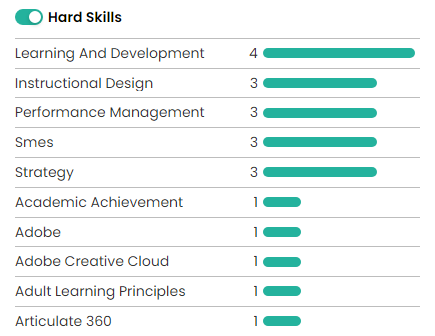
Without superpowers, it is not feasible to apply for 631 jobs in one week. Time to Apply and Available TimePersonally, when I decide to apply for a given role, I take about 30 minutes to research the company, customize my resume, and complete my formal application. In a given week, there are 7 days, which is 168 hours. There are not enough hours in a week for me to apply for that many jobs. Even if I somehow managed not to eat, sleep, or do even the most basic self-care, I could only apply for 336 jobs. Closer to the realm of feasibility, if I decided to dedicate a full 40 hours per week solely to applying for jobs, I could apply for 80 jobs—but definitely not well. In addition, working this long and this hard solely on submitting applications can put you on the fast track to burnout. Even half that, dedicating 20 hours solely to applying for jobs, and applying for 40 jobs in a given week, is most likely overkill. More Is Not Necessarily BetterThe more jobs I try to apply for in rapid succession, the less effective I am. While applying for jobs is in some respects, a numbers game, it’s not as easy as applying to all the jobs and knowing that one will work out. This strategy often causes people to waste time applying for roles that aren't a close enough fit. A better strategy is to prioritize jobs that are the best match for your skills and what you want and focus on applying for those well. When I'm in career transition, my goal is usually to apply for three jobs per week. However, if I see several great opportunities or have not searched for a job in a while, I may apply for as many as six. Beyond that, though, my application quality suffers. Prioritizing ApplicationsTo apply for jobs well, you need to determine the best way to prioritize your applications. Instead of the “spray and pray” approach, think through what you want and apply with more purpose. This approach favors quality over quantity and will help you focus your efforts on where you can get better overall results for your time investment. Step 1: Know Key Characteristics of What You WantEarly in your job search, it’s essential to do at least a little soul-searching and be able to articulate what you want. This may include revisiting your values, identifying your strengths, and thinking about the work you enjoy. For example, earlier career Brenda would have a list something like this on what she wanted from a role:
Having a stated list of preferences, and continuing to hone it as you learn more, is your first step in determining which jobs to target. Step 2: Narrowing Your SearchLet's go back to those 631 search results from my Training Specialist searches. By adding additional search parameters, we can narrow our results to jobs that more specifically meet our criteria: Starting with those 43 roles in Omaha:
Starting with those 588 remote jobs:
Step 3: Quick Job Listing ReviewNow that I have a more reasonable number of jobs to go through (12 and 45--57 total), I start to do a cursory review of the short descriptions of each role. No
Yes
I have now reduced the number of jobs that interest me to 31 roles. Step 4: More Detailed Job Listing ReviewNow that I have those 31 jobs in Teal, I look more closely at the following:
I remove jobs where I am not eligible. This includes the following:
I remove jobs with anything that might be a dealbreaker for me. This includes the following:
For the remaining jobs, I give them an initial rating of 1-5 stars and make notes on any areas I might want to explore further. I now have 18 jobs in Teal. Step 5: A Little More ResearchNext, I investigate a few things outside of the immediate job descriptions.
Now, I have 13 jobs In Teal. Step 6: Customize a Resume and Prepare to ApplyFrom the 13 jobs I have listed, I will apply for the jobs I'm most excited about and continue to reassess other openings listed. I will also add, remove, reprioritize, and take notes on specific roles as needed. Learn MoreBy Brenda L. Peterson, The Layoff Lady The Value of Professional NetworkingWhen it comes to job searching, professional networking is a critical component of success. Ideally, you make initial connections with people through LinkedIn (maybe even after meeting them in person or at an online group event). While this is a great start, there is value in building relationships beyond that initial connection. A 1:1 meeting can significantly strengthen a networking relationship and help you learn how you and your new connection can help one another succeed. About 1:1 Networking MeetingsSo what exactly is a networking meeting? Back in the day, I remember hearing people talk about doing "informational interviews." In short, if you were interested in having a particular job or working with a specific company, you would contact an organization or individual and ask if they would meet you for an informational interview. In this 1:1 meeting, which could take place via phone or in person, you might learn about the company, what they are looking for, skills to acquire, and more. It also allowed you to start to build a relationship with a company--or a possible advocate in the person doling out said information. Fast forward to now. Today, a networking meeting is typically between you and another person deciding to spend a half hour-ish together. This meeting, sometimes called a coffee chat, could happen virtually via Zoom or in person, often over coffee. If you're job searching, the typical focus will be on how to progress in your job search. Someone may agree to a networking meeting because you have things in common (like a field of work, background, professional goals), because they are generally committed to helping people when they are job searching, or because you have a mutual acquaintance to ask that person to meet with you to help you out. Networking Meeting = Informal InterviewWhenever you have an opportunity to meet one-on-one with someone, remember that you are taking part in a type of informal interview. Whenever I meet with someone in career transition, my goal is to help them figure out their next steps, offer advice (if they ask and are interested), and give them ideas on further steps they might take, including who they should speak with next While I go in with this idea, the amount of help I'll provide also depends on how this networking meeting goes. Ideally, we have a good, productive conversation, and I think to myself, "I totally want to help this person more." If the meeting goes well, I'll refer them to specific resources that might benefit them (like a networking group they might want to join, a company to check out, someone to follow on LinkedIn) and even put in a good word for them to have a networking meeting with someone else who might get them closer to their goals. In addition, if it goes REALLY well, this is a person who I'll refer to others for openings, pass on job opportunities, and maybe even hire someday. If the meeting doesn't go well, I'll share a few resources, but I may not be willing to help them as actively moving forward. Remember, any interaction you have with people will impact their desire to help you in the future. Types of Networking MeetingsHere are a few common types of networking meetings:
Networking Meeting Best PracticesHere are a few best practices for networking meetings:
The True Power of Networking MeetingsWhen people talk about how they "networked" into a new job, typically, that means they leveraged their initial connections to help make inroads with new contacts, who helped them get closer to a new position. The holy grail of networking meetings is when the person you meet with agrees to introduce you to someone else they know who could help you. That process repeats until you're talking to a hiring manager or influencer who can help you get an interview for a job. Having good networking meetings is a critical step in that process. Learn MoreBy Brenda L. Peterson, The Layoff Lady Getting To Know Your LinkedIn ConnectionsConnecting with someone on LinkedIn is a great way to start a formalized relationship with someone in your professional network. While that is a great start, deepening those relationships is a helpful next step to get more value out of LinkedIn. Let's look at a few ways to do just that. Interacting with PostsInteracting with posts on LinkedIn is a great way to continue to build relationships with your connections and demonstrate your professional value. Not only is this a great way to build your credibility with many connections at the same time, it also gives you an opportunity to showcase your knowledge without having to choose the initial content for the post. You can also use your comments to interact with others and even use this as a starting point to invite other commenters to connect. Adding Your ReactionThe easiest way to interact is by adding a reaction to a post. With a click of a button, you can like a post or select from the other available responses. When you react to a post, your name will be listed on the post as well. This is an easy way to have people see your name and affiliate it with the content you liked. Adding your reaction also helps more people see the original post. Commenting on a PostAn even more valuable way to interact with a post is by commenting. Once you have connected with someone, reading and commenting on their posts is an excellent way to build on that relationship. This way, they are starting the conversation, and you are helping expand on that content by adding your ideas. In addition, you can comment on other people's comments and share additional value. You can thank the initial poster for sharing the idea, add your thoughts, share your experiences, and illustrate how you have used the concept in practice. Commenting on posts also gives you an inroad to connect with someone else who is also interacting with that post. Commenting is a great way to interact with others in your profession, build credibility, and make more meaningful connections. It also helps to achieve one of your LinkedIn goals of showcasing your knowledge and also sharing valuable information. RepostingIf someone posts something of value to your connections, you may want to comment on the post itself and then consider reposting it with your comments. When you repost content, first, you'll see anything you typed, then LinkedIn will include the entire original post. This helps the original post get additional views and also enables you to share useful content with your network. When I repost content, I usually include "Thanks [original poster] for sharing this information!" To include the original poster's name, include the @, then type the first part of their name, and choose their name from the options provided. (This is often called an "at mention." This will tag them in the post so they can interact with your new post, which will help boost the number of people who see the post. Sharing Your Own LinkedIn PostsSharing content on LinkedIn is a great way to engage with your connections, add value to your professional relationships, and promote who you are and what you know. Unfortunately, very few people ever post anything at all--which is a huge missed opportunity to differentiate yourself from others in your field. Another question that comes up is the frequency of posting. I recommend posting on LinkedIn no more than once a day and posting one to four times per week. Use your favorite search engine for recommendations on the best times and days of the week to post to get the most views on your posts. As for content, you don't have to write a lengthy, original manifesto to post on LinkedIn and make an impact. Personally, most of the content I share on LinkedIn includes some version of the following:
Once you make a post, be sure to like any comments other people make on your post and even reply to each comment. The more likes and comments you receive on your post, the more people will see it. This will continue to build your professional brand and add value to the networking relationships you are fostering through LinkedIn. Learn More
By Brenda L. Peterson, The Layoff Lady Employer-Focused Career PlanningWhen you think about your career, you may think in terms of your current job title, what the company needs from you, and how your job might change based on organizational needs. This employer-focused mindset prioritizes the success of the business above all else. Often, the career planning offered by your employer is a part of their overall succession planning and focused on making sure their workforce has the skills to address anticipated future company needs. It's important to remember that the needs of a given business will change over time, as will company leaders, the market, the economy, and more. If that employer's needs no longer align with the skills you have and the salary they pay you for those skills, the company may make the business decision to "go in another direction." The end result may be them finding someone else to do the work they need done regardless of the skill set they encouraged you to develop. Your New Mindset: Realistic OptimistIn much of life, having the right mindset makes all the difference. I choose to be a Realistic Optimist. That means I acknowledge the challenges inherent in situations and also realize that I have the power to make choices that will help me achieve a positive result--in this case, a career that is meaningful and fulfilling for me. Let's look at a few of the realities of work and your career:
Let's also look at what that means for you:
Given these realities, thinking of your work future only in terms of who is currently signing your paychecks is not the wisest course of action. Instead, it's time to shift how you think about your work life. You can not afford to prioritize an employer's needs over what you want and need from your career. It's time to give yourself a promotion! Congratulations! You are The CEO of YouLeveraging your Realistic Optimist mindset, you are now no longer just an employee doing what your current employer wants and needs you to do. Now, it’s time for you to think of yourself first and foremost as the Chief Executive Officer of your own company and the business of you. This makes you the CEO of You. As the CEO of You, you are looking for employment that is a good business arrangement for you. Just like the executive team at a company needs to make tough decisions for the organization’s greater good, you need to make decisions that are in the best interests of you and your household. Adopting this mindset will change your life. The Business of YouAs the CEO of You, it’s time to think about what success looks like for your business. What are your assets? What are your marketable skills? Which company or companies should be your business partners? When is it time for you to end a business relationship that is not working? When is it time for you to pursue a new opportunity better aligned with your life? Whereas you as an employee may feel like you do not have any options, you can't afford to think about your livelihood just in terms of what your biggest client (your current employer) needs. Instead, you need to make decisions for the good of your business as the CEO of You. One of those is determining how to protect one of your greatest assets–your ability to earn a living by leveraging your knowledge, skills, and expertise. You also want to stay mindful of all the aspects of the employment decisions you make and how they impact your overall wellbeing--including your career, physical, financial, social, and community wellbeing. Your Short and Long-Term GoalsAs the CEO of You, think about your long-term goals. Just like the company's CEO does not make decisions based on what other companies think they should do, you need to do the same. Regardless of other people’s opinions, make the right decision for you and your household. Align your next steps with your overall goals. Think in terms of preferences and priorities. Remember, too, that you’re not just the CEO of your career but the CEO of all aspects of you. If you're in career transition and searching for a new role, this means not taking “any old job” unless you decide that is the right move for you. If you're employed by an organization that wants you to learn a new skill set, you get to decide if that interests you and how you will invest your time, talents, and money to build those skills. You get to decide what is a valuable opportunity for you and decide your next steps as you work toward aligning what your employer needs and what you want to do. This also means that your business decisions may change over time as the environment changes. You can also change your mind about the right job for you if your current role has enough value for you to stay, when it is time for you to do something else, how you want to change direction, and more. Adjusting Your Business StrategyAt the end of the day, remember your role as the CEO of you and make a decision that aligns with your overall career and life goals. If that means quitting a job that makes you miserable regardless of the short-term financial consequences, you can do that. If you want to leave a job that your friends say should be your dream job, you get to make the right decision for you. If you decide to take your career in a whole new direction that others might think is too risky, you get to weigh your options and go in the direction of your choice. As the CEO of You, you are the driver of your career and your life. Act accordingly. Learn More |

Just get laid off?
Click here for info on what to do first. 
Author7-time layoff survivor Brenda L. Peterson, The Layoff Lady, waxes poetic on layoffs, job transitions, & career resilience. Buy The Book!
Were you recently laid off from your job and need a roadmap for what's next? Pick up a copy of my book, Seven Lessons From Seven Layoffs: A Guide!
Categories
All
Archives
July 2024
|